Category: tech life
-

Webmention Repost Test
Trying to get these set up on this blog nicely – I’ll have to make a few weird posts to get this working, I think, so my apologies to everyone on my RSS who might get some noise in their readers today!Likes Azhdarchid now supports Webmentions by Bruno Dias.Azhdarchid now supports WebmentionsSurely my presence is…
-
Webmentioning with a bookmark…
Testing them all, woooo This one’s a bookmark! And here’s where I write about the bookmark specifically! And here’s more info I can add that won’t show up inside the webmention, I think?
-
Webmention Reply Testing
Getting fancy with these! Reply testing! This one I want to know exactly how much text I can send around, because I want to be able to think about exactly what part of my reply should show up on someone else’s website, y’know? So I am going to be verbose in here as a test…
-
Webmention Testing Continues
doing the ol’ self-mention to see how my site plays with these: Liking my own webmentions post, which I like for good reasons, which I have learned go here inside the mention! And then continuing my post outside of the mention!
-
Learning about webmentions!
Trying to get these set up on this blog nicely – I’ll have to make a few weird posts to get this working, I think, so my apologies to everyone on my RSS who might get some noise in their readers today! Shoutout to Bruno and also surasshu and Natalie and everyone else in the…
-

Jey Pawlik Explains RSS!
One of my fav tech savvy cartoonists wrote up a huge post on what RSS is, how you can use it, how they’re using it in two different apps, and more! Jey’s a great explainer of complicated things, and if you’ve been noticing folks talking about RSS more these days, this is a great overview…
-
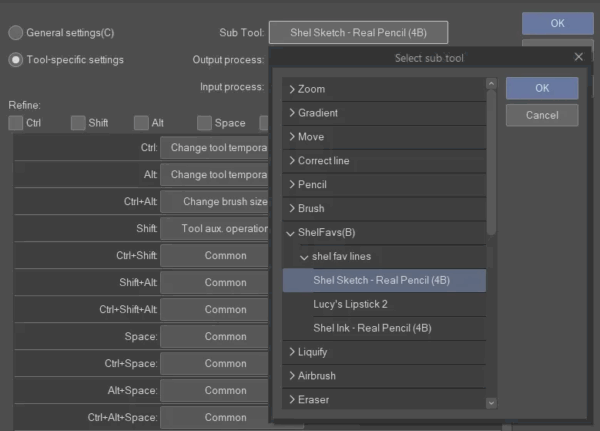
Customizing Shortcuts (and more) in Clip Studio Paint
New to digital art? Switching to Clip Studio Paint? Either way, it can be helpful to know how to learn and customize all the various keyboard shortcuts it offers! I wrote this up in an Art Director capacity but seems like the kind of thing other folks might want to reference sometimes too! So, here…
-
Feeds vs Blogs Thoughts
so when I reformatted my website, one of the things that I wanted to do was make it possible to post casually to this, with a similar energy to how I used to post on social media. you know, with the hope of getting myself free from social media and not simply just falling back…
-
learned something important about my website
i have footnote capabilities already! Ahh, the newly distracting ways I can write, unfolding before my like cells in the library of babel… Unfortunately I am already not to be trusted with most punctuation; I will resist all efforts to simplify my sentences, and I WILL nest (or embed) too many clauses! Anyways, this has…
-

Recommended: the Wacom ExpressKey Remote
I want to talk a bit about this tool! It’s put out by Wacom, who make those screen tablets and drawing tablets that you’ve probably seen artists reference online. Wacom are an old, maybe the oldest brand in that space, and while I wouldn’t describe them as hugely experimental, they do have the decades of…